github actions の artifact を直接開いて 複数ファイルをまとめて見たいので foolhtml を作った
昨日、GitHub Actions で大きなアップデートがありました。
actions/upload-artifact において、 zip じゃなくてもアップロードできるようになって
artifact の URL をダウンロードすることなく、ブラウザで直接開けるようになりました。
一方で、この機能は難点があり、このブログを書いた時点では、1ファイルしかアップロードできません。
そのため、それを解決するために、foolhtml という雑なツールを作りました。
まずは、GitHub Actions のアップデートと組み合わせたときのデモを見てください。
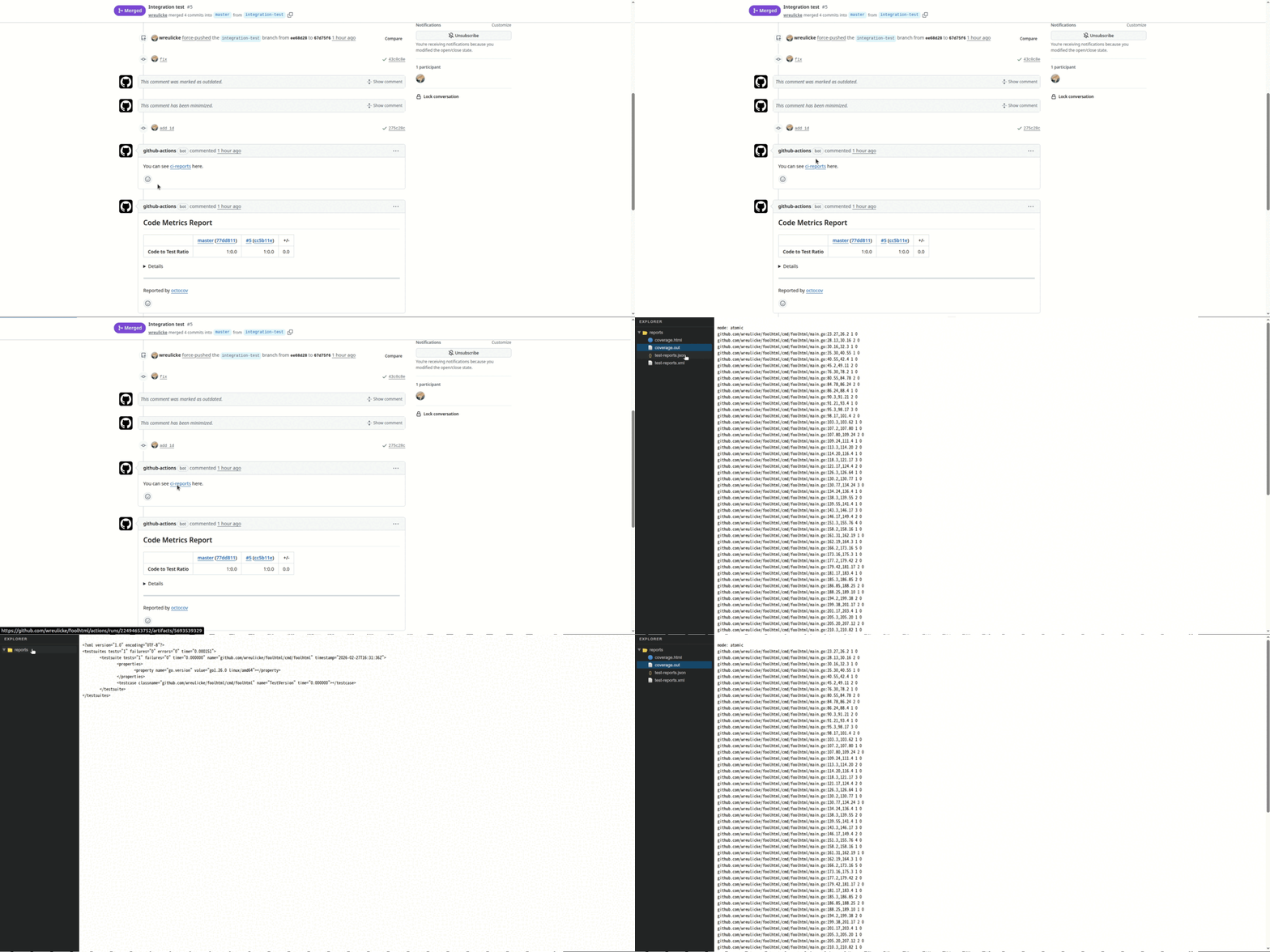
PRのコメントから html を開くだけで、複数のファイルがCIのレポートとして読み取れるようになりました。
入力のディレクトリにあるファイルをすべて 1枚の html にまとめて、html 1枚でビューアのような状態を作っています。
表示部分はほぼAIが書きました。
デモで使ったGitHub Actions のサンプルはこんな感じです。github actions も用意しているので使ってみてください。
jobs:
  test:
    runs-on: ubuntu-latest
    steps:
      - uses: actions/checkout@v6

      - uses: wreulicke/foolhtml@master
        with:
          output: /tmp/output.html
          inputs: |
            path/to/file1.html
            path/to/dir/

      - uses: actions/upload-artifact@v7
        id: upload-artifact
        with:
          name: ci-report
          archive: false # actions/upload-artifact のアップデートで追加された
          path: /tmp/output.html

      - uses: actions/github-script@v6
        if: github.event_name == 'pull_request'
        env:
          ARTIFACT_URL: ${{ steps.upload-artifact.outputs.artifact-url }}
        with:
          script: |
            const artifactUrl = process.env.ARTIFACT_URL;
            const commentBody = `You can see [ci-reports](${artifactUrl}) here.`;
            await github.rest.issues.createComment({
              issue_number: context.issue.number,
              owner: context.repo.owner,
              repo: context.repo.repo,
              body: commentBody,
            });
なお、CircleCIでは、複数のファイルのアップロードが出来て普通に開けるので、こんなことは考えなくても良いのでたまにCircleCIが恋しくなります。
CircleCI の test analysis の機能とかも好きでした。
終わり。
ツールのリポジトリはここです。
外部のGitHub Actionsを利用する際、semverで指定していない場合は、dependabot alertで脆弱性を検知できない
タイトル通りなのですが、共有を兼ねて、ブログに起こしておきます。 ドキュメントに、以下の文章があります。
Dependabot は、セマンティック バージョン管理を使用する脆弱な GitHub Actions に対してのみ、Dependabot alerts を作成します。
SHA バージョン管理を使用する脆弱なアクションのアラートは受け取れません。
SHA バージョン管理で GitHub Actions を使用する場合は、
リポジトリまたは組織に対して Dependabot version updates を有効にして、
使用するアクションを最新バージョンに更新しておくことをおすすめします。
link: Dependabot アラートについて - GitHub Docs
つまり、以下のように、digestで固定している場合は、脆弱性検知対象にはならないので、注意が必要です。 そのため、dependabot alert で脆弱性検知対象とするには、以下のdigestがsemverでいう何のバージョンなのか githubのdependency submission APIを使って、semverに直して依存バージョンを登録する必要がありそうです。
- uses: actions/checkout@83b7061638ee4956cf7545a6f7efe594e5ad0247
ドキュメントを見ていて気づいて、知らない人も多そうなので、ブログに起こしてみました。
終わり。
Javaでwildcard importを禁止する方法
Javaでwildcard importを禁止する方法を紹介します。
やり方としてはいくつかありますが、結論としては、errorproneのルールをerrorにしましょう。 errorproneであれば自動修正が可能です。
以下が、gradleでの設定例です。net.ltgt.errorprone プラグインを使っています。
plugins {
    id 'net.ltgt.errorprone'
}

tasks.withType(JavaCompile).configureEach {
    options.errorprone {
        error("WildcardImport")
    }
}
errorproneのルールを使えば、suggested fix の機能で自動的に修正が可能です。(ドキュメント的には、suggested replacementらしいが) gradleで suggested fix をうまく使う方法については以下の記事を参照してください。
checkstyleで禁止する方法
AvoidStarImportのルールがあるのでそちらを使うと良いです
pmdで禁止する方法
無さそうです。
spotlessで禁止(?)する方法
以下のissueでは、正規表現で importを消すことで禁止を表現していますが errorproneで禁止したほうが自動的に修正出来るので、そちらの方が良いでしょう。
